

Updates:
10 Feb 2024: Added some features from JaiZed's branch such as skipping if SDH subtitles are detected, functions updated to also be able to transcribe audio files, allow individual files to be manually transcribed, and a better implementation of forceLanguage. Added /batch endpoint (Thanks JaiZed). Allows you to navigate in a browser to http://subgen_ip:8090/docs and call the batch endpoint which can take a file or a folder to manually transcribe files. Added CLEAR_VRAM_ON_COMPLETE, HF_TRANSFORMERS, HF_BATCH_SIZE. Hugging Face Transformers boast '9x increase', but I have been unable to test them at this point. As of now, the Hugging Face Models will be re-downloaded on container restart, there is currently no function to set a save/download directory. Simplest work around is use the environment variable "HF_HUB_CACHE" and set it to "/subgen" for Docker.
8 Feb 2024: Added FORCE_DETECTED_LANGUAGE_TO to force a wrongly detected language. Fixed asr to actually use the language passed to it.
5 Feb 2024: General housekeeping, minor tweaks on the TRANSCRIBE_FOLDERS function. Added a GHCR repo in addition to Dockerhub.
28 Jan 2024: Fixed issue with ffmpeg python module not importing correctly. Removed separate GPU/CPU containers. Also removed the script from installing packages, which should help with odd updates I can't control (from other packages/modules). The image is a couple gigabytes larger, but allows easier maintenance.
19 Dec 2023: Added the ability for Plex and Jellyfin to automatically update metadata so the subtitles shows up properly on playback. (See https://github.com/McCloudS/subgen/pull/33 from Rikiar73574)
31 Oct 2023: Added Bazarr support via Whipser provider.
25 Oct 2023: Added Emby (IE http://192.168.1.111:8090/emby) support and TRANSCRIBE_FOLDERS, which will recurse through the provided folders and generate subtitles. It's geared towards attempting to transcribe existing media without using a webhook.
23 Oct 2023: There are now two docker images, ones for CPU (it's smaller): mccloud/subgen:latest, mccloud/subgen:cpu, the other is for cuda/GPU: mccloud/subgen:cuda. I also added Jellyfin support and considerable cleanup in the script. I also renamed the webhooks, so they will require new configuration/updates on your end. Instead of /webhook they are now /plex, /tautulli, and /jellyfin.
22 Oct 2023: The script should have backwards compability with previous envirionment settings, but just to be sure, look at the new options below. If you don't want to manually edit your environment variables, just edit the script manually. While I have added GPU support, I haven't tested it yet.
19 Oct 2023: And we're back! Uses faster-whisper and stable-ts. Shouldn't break anything from previous settings, but adds a couple new options that aren't documented at this point in time. As of now, this is not a docker image on dockerhub. The potential intent is to move this eventually to a pure python script, primarily to simplify my efforts. Quick and dirty to meet dependencies: pip or pip3 install flask requests stable-ts faster-whisper
This potentially has the ability to use CUDA/Nvidia GPU's, but I don't have one set up yet. Tesla T4 is in the mail!
2 Feb 2023: Added Tautulli webhooks back in. Didn't realize Plex webhooks was PlexPass only. See below for instructions to add it back in.
31 Jan 2023 : Rewrote the script substantially to remove Tautulli and fix some variable handling. For some reason my implementation requires the container to be in host mode. My Plex was giving "401 Unauthorized" when attempt to query from docker subnets during API calls. (Fixed now, it can be in bridge)
What is this?
This will transcribe your personal media on a Plex, Emby, or Jellyfin server to create subtitles (.srt) from audio/video files with the following languages: https://github.com/McCloudS/subgen/edit/main/README.md#audio-languages-supported-via-openai and transcribe or translate them into english. It technically has support to transcribe from a foreign langauge to itself (IE Japanese > Japanese, see TRANSCRIBE_OR_TRANSLATE). It is currently reliant on webhooks from Jellyfin, Plex, or Tautulli. This uses stable-ts and faster-whisper which can use both Nvidia GPUs and CPUs.
Why?
Honestly, I built this for me, but saw the utility in other people maybe using it. This works well for my use case. Since having children, I'm either deaf or wanting to have everything quiet. We watch EVERYTHING with subtitles now, and I feel like I can't even understand the show without them. I use Bazarr to auto-download, and gap fill with Plex's built-in capability. This is for everything else. Some shows just won't have subtitles available for some reason or another, or in some cases on my H265 media, they are wildly out of sync.
What can it do?
- Create .srt subtitles when a SINGLE media file is added or played to Jellyfin or Plex which triggers off of Jellyfin, Plex, or Tautulli webhooks.
How do I set it up?
Install/Setup
Standalone/Without Docker
install python3 and ffmpeg and run pip3 install numpy stable-ts fastapi requests faster-whisper uvicorn python-multipart python-ffmpeg whisper. You need to have matching paths relative to your Plex server/folders, or use USE_PATH_MAPPING.
Docker
The dockerfile is in the repo along with an example docker-compose file, and is also posted on dockerhub (mccloud/subgen) and GHCR (ghcr.io/mcclouds/subgen:latest).
You MUST mount your media volumes in subgen the same way Plex sees them. For example, if Plex uses "/Share/media/TV:/tv" you must have that identical volume in subgen.
"${APPDATA}/subgen:/subgen" is just for storage of the python script and the language model. This volume isn't necessary, just a nicety. If you map this volume, you will have to likely manually place subgen.py and update it yourself, so it is not recomended unless you are doing dev work.
If you want to use a GPU, you need to map it accordingly.
Plex
Create a webhook in Plex that will call back to your subgen address, IE: http://192.168.1.111:8090/plex see: https://support.plex.tv/articles/115002267687-webhooks/ You will also need to generate the token to use it.
Emby
All you need to do is create a webhook in Emby pointing to your subgen IE: http://192.168.154:8090/emby
Emby was really nice and provides good information in their responses, so we don't need to add an API token or server url to query for more information.
Bazarr
You only need to confiure the Whisper Provider as shown below:
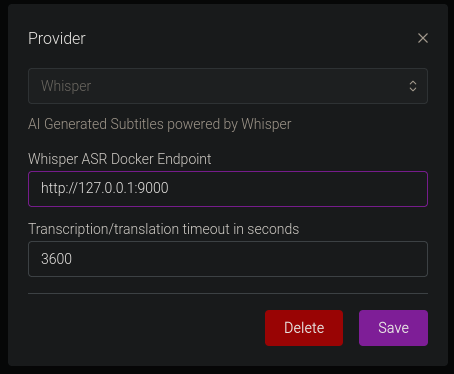
The Docker Endpoint is the ip address and port of your subgen container (IE http://192.168.1.111:8090) See https://wiki.bazarr.media/Additional-Configuration/Whisper-Provider/ for more info. I recomend not enabling this with other webhooks, or you will likely be generating duplicate subtitles.
Tautulli
Create the webhooks in Tautulli with the following settings: Webhook URL: http://yourdockerip:8090/tautulli Webhook Method: Post Triggers: Whatever you want, but you'll likely want "Playback Start" and "Recently Added" Data: Under Playback Start, JSON Header will be:
{ "source":"Tautulli" }
Data:
{
            "event":"played",
            "file":"{file}",
            "filename":"{filename}",
            "mediatype":"{media_type}"
}
Similarly, under Recently Added, Header is:
{ "source":"Tautulli" }
Data:
{
            "event":"added",
            "file":"{file}",
            "filename":"{filename}",
            "mediatype":"{media_type}"
}
Jellyfin
First, you need to install the Jellyfin webhooks plugin. Then you need to click "Add Generic Destination", name it anything you want, webhook url is your subgen info (IE http://192.168.1.154:8090/jellyfin). Next, check Item Added, Playback Start, and Send All Properties. Last, "Add Request Header" and add the Key: Content-Type Value: application/json
Click Save and you should be all set!
Variables
You can define the port via environment variables, but the endpoints are static.
The following environment variables are available in Docker. They will default to the values listed below.
| Variable | Default Value | Description |
|---|---|---|
| TRANSCRIBE_DEVICE | 'cpu' | Can transcribe via gpu (Cuda only) or cpu. Takes option of "cpu", "gpu", "cuda". |
| WHISPER_MODEL | 'medium' | Can be:'tiny', 'tiny.en', 'base', 'base.en', 'small', 'small.en', 'medium', 'medium.en', 'large-v1','large-v2', or 'large' |
| CONCURRENT_TRANSCRIPTIONS | 2 | Number of files it will transcribe in parallel |
| WHISPER_THREADS | 4 | number of threads to use during computation |
| MODEL_PATH | '.' | This is where the WHISPER_MODEL will be stored. This defaults to placing it where you execute the script |
| PROCADDEDMEDIA | True | will gen subtitles for all media added regardless of existing external/embedded subtitles (based off of SKIPIFINTERNALSUBLANG) |
| PROCMEDIAONPLAY | True | will gen subtitles for all played media regardless of existing external/embedded subtitles (based off of SKIPIFINTERNALSUBLANG) |
| NAMESUBLANG | 'aa' | allows you to pick what it will name the subtitle. Instead of using EN, I'm using AA, so it doesn't mix with exiting external EN subs, and AA will populate higher on the list in Plex. |
| SKIPIFINTERNALSUBLANG | 'eng' | Will not generate a subtitle if the file has an internal sub matching the 3 letter code of this variable (See https://en.wikipedia.org/wiki/List_of_ISO_639-1_codes) |
| WORD_LEVEL_HIGHLIGHT | False | Highlights each words as it's spoken in the subtitle. See example video @ https://github.com/jianfch/stable-ts |
| PLEXSERVER | 'http://plex:32400' | This needs to be set to your local plex server address/port |
| PLEXTOKEN | 'token here' | This needs to be set to your plex token found by https://support.plex.tv/articles/204059436-finding-an-authentication-token-x-plex-token/ |
| JELLYFINSERVER | 'http://jellyfin:8096' | Set to your Jellyfin server address/port |
| JELLYFINTOKEN | 'token here' | Generate a token inside the Jellyfin interface |
| WEBHOOKPORT | 8090 | Change this if you need a different port for your webhook |
| USE_PATH_MAPPING | False | Similar to sonarr and radarr path mapping, this will attempt to replace paths on file systems that don't have identical paths. Currently only support for one path replacement. Examples below. |
| PATH_MAPPING_FROM | '/tv' | This is the path of my media relative to my Plex server |
| PATH_MAPPING_TO | '/Volumes/TV' | This is the path of that same folder relative to my Mac Mini that will run the script |
| TRANSCRIBE_FOLDERS | '' | Takes a pipe '|' separated list (For example: /tv|/movies|/familyvideos) and iterates through and adds those files to be queued for subtitle generation if they don't have internal subtitles |
| TRANSCRIBE_OR_TRANSLATE | 'transcribe' | Takes either 'transcribe' or 'translate'. Transcribe will transcribe the audio in the same language as the input. Translate will transcribe and translate into English. |
| COMPUTE_TYPE | 'auto' | Set compute-type using the following information: https://github.com/OpenNMT/CTranslate2/blob/master/docs/quantization.md |
| DEBUG | False | Provides some debug data that can be helpful to troubleshoot path mapping and other issues. Fun fact, if this is set to true, any modifications to the script will auto-reload it (if it isn't actively transcoding). Useful to make small tweaks without re-downloading the whole file. |
| FORCE_DETECTED_LANGUAGE_TO | '' | This is to force the model to a language instead of the detected one, takes a 2 letter language code. For example, your audio is French but keeps detecting as English, you would set it to 'fr' |
| CLEAR_VRAM_ON_COMPLETE | 'True' | This will delete the model and do garbage collection when queue is empty. Good if you need to use the VRAM for something else. |
| HF_TRANSFORMERS | 'False' | Uses Hugging Face Transformers models that should be faster, not tested as of now because HF is down. |
| HF_BATCH_SIZE | 24 | Batch size to be used with above. Batch size has a correlation to VRAM, not sure what it is yet and may require tinkering. |
Images:
mccloud/subgen:latest or mccloud/subgen:cpu is CPU only (smaller)
mccloud/subgen:cuda is for GPU support
There is now only a single image being maintained, the image has everything necessary to do both CPU and GPU.
What are the limitations/problems?
- If Plex adds multiple shows (like a season pack), it may fail to process subtitles.
- Long pauses/silence behave strangely. It will likely show the previous or next words during long gaps of silence. (This is appears mostly fixed now using stable-ts!)
- I made it and know nothing about formal deployment for python coding.
- It's using trained AI models to transcribe, so it WILL mess up
What's next?
I'm hoping someone that is much more skilled than I, to use this as a pushing off point to make this better. In a perfect world, this would integrate with Plex, Sonarr, Radarr, or Bazarr. Bazarr tracks failed subtitle downloads, I originally wanted to utilize its API, but decided on my current solution for simplicity.
Optimizations I can think of off hand:
- Add an ability via a web-ui or something to generate subtitles for particular media files/folders. (No GUI planned, but TRANSCRIBE_FOLDERS can do this)
Audio Languages Supported (via OpenAI)
Afrikaans, Arabic, Armenian, Azerbaijani, Belarusian, Bosnian, Bulgarian, Catalan, Chinese, Croatian, Czech, Danish, Dutch, English, Estonian, Finnish, French, Galician, German, Greek, Hebrew, Hindi, Hungarian, Icelandic, Indonesian, Italian, Japanese, Kannada, Kazakh, Korean, Latvian, Lithuanian, Macedonian, Malay, Marathi, Maori, Nepali, Norwegian, Persian, Polish, Portuguese, Romanian, Russian, Serbian, Slovak, Slovenian, Spanish, Swahili, Swedish, Tagalog, Tamil, Thai, Turkish, Ukrainian, Urdu, Vietnamese, and Welsh.
Additional reading:
- https://github.com/ggerganov/whisper.cpp/issues/89 (Benchmarks)
- https://github.com/openai/whisper/discussions/454 (Whisper CPU implementation)
- https://github.com/openai/whisper (Original OpenAI project)
- https://en.wikipedia.org/wiki/List_of_ISO_639-1_codes (2 letter subtitle codes)
Credits:
- Whisper.cpp (https://github.com/ggerganov/whisper.cpp) for original implementation
- ffmpeg
- https://github.com/jianfch/stable-ts
- https://github.com/guillaumekln/faster-whisper
- Whipser ASR Webservice (https://github.com/ahmetoner/whisper-asr-webservice) for how to implement Bazarr webhooks.