

Howdy all,
This is a project I've had running for a bit, then cleaned up for 'release' while the kids were sleeping. It's more of a POC, piece of crap, or a proof of concept. This was also my first ever Python usage.
What is this?
This is a half-assed attempt of transcribing subtitles (.srt) from your personal media in a Plex server using a CPU. It is currently reliant on Tautulli for webhooks from Plex. Why? During my limited testing, Plex was VERY sporadically actually sending out their webhooks using their built-in functionality (https://support.plex.tv/articles/115002267687-webhooks). Tautulli gave a little bit more functionality, and for my use case, didn't require doing a bunch of Plex API calls because their webhooks had all the functionality I needed. This uses whisper.cpp which is an implementation of OpenAI's Whisper model to use CPUs (Do your own research!). While CPUs obviously aren't super efficient at this, but my server sits idle 99% of the time, so this worked great for me.
What can it do?
- Create .srt subtitles when a SINGLE media file is added or played via Plex which triggers off of Tautulli webgooks.
How do I set it up?
You need a working Tautulli installation linked to your Plex. Repo for subgen is @ https://github.com/McCloudS/subgen.
Create the webhooks in Tautulli with the following settings:
Webhook URL: http://yourdockerip:8090
Webhook Method: Post
Triggers: Whatever you want, but you'll likely want "Playback Start" and "Recently Added"
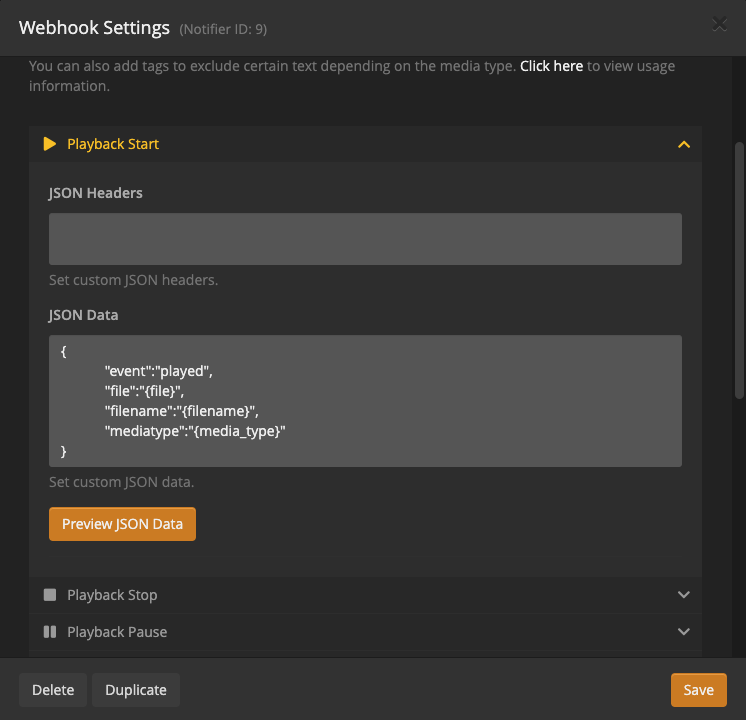
Data: Under Playback Start, JSON Headers will be blank, JSON Data will be:
{
            "event":"played",
            "file":"{file}",
            "filename":"{filename}",
            "mediatype":"{media_type}"
}
Similarly, under Recently Added:
{
            "event":"added",
            "file":"{file}",
            "filename":"{filename}",
            "mediatype":"{media_type}"
}
It should look like:
The docker-compose/Dockerfile settings are relatively straight forward (and poorly commented).
ARG WHISPER_MODEL medium this can be tiny, base, small, medium, large
ARG WHISPER_SPEEDUP False this adds the option -su "speed up audio by x2 (reduced accuracy)"
ARG WHISPER_THREADS 4 number of threads to use during computation
ARG WHISPER_PROCESSORS 1 number of processors to use during computation
ARG PROCADDEDMEDIA True will gen subtitles for all media added regardless of existing external/embedded subtitles
ARG PROCMEDIAONPLAY True will gen subtitles for all played media regardless of existing external/embedded subtitles
ARG NAMESUBLANG aa use 2 letter codes @ https://en.wikipedia.org/wiki/List_of_ISO_639-1_codes // makes it easier to see which subtitles are generated by subgen -- names file like: "Community - S03E18 - Course Listing Unavailable.aa.subgen.srt"
ARG UPDATEREPO True pulls and merges whisper.cpp on every start
NAMESUBLANG allows you to pick what it will name the subtitle. Instead of using EN, I'm using AA, so it doesn't mix with exiting external EN subs, and AA will populate higher on the list in Plex.
Docker Volumes
You MUST mount your media volumes in subgen the same way Plex sees them. For example, if Plex uses "/Share/media/TV:/tv" you must have that identical volume in subgen.
"${APPDATA}/subgen:/whisper.cpp" is just for storage of the cloned and compiled code, also the models are stored in the /whisper.cpp model, so it will prevent redownloading them. This volume isn't necessary, just a nicety.
What are the limitations?
- If Plex adds multiple shows (like a season pack), it will fail to process subtitles. It is reliant on a SINGLE file to accurately work now.
- Long pauses/silence behave strangely. It will likely show the previous or next words during long gaps of silence.
- I made it and know nothing about formal deployment for python coding.
- There is no 'wrapper' for python for whisper.cpp at this point, so I'm just using subprocess.call
What's next?
Honestly, I built this for me, but saw the utility in other people maybe using it. This works well for my use case. Since having children, I'm either deaf or wanting to have everything quiet. We watch EVERYTHING with subtitles now, and I feel like I can't even understand the show without them. I use Bazaar to auto-download, and gap fill with Plex's built-in capability. This is for everything else. Some shows just won't have subtitles available for some reason or another, or in some cases on my H265 media, they are wildly out of sync. I'm hoping someone that is much more skilled than I, to use this as a pushing off point to make this better. In a perfect world, this would integrate with Plex, Sonarr, Radarr, or Bazaar. Bazaar tracks failed subtitle downloads, I originally wanted to utilize it's API, but decided on my current solution for simplicity.
Additional reading:
- https://github.com/ggerganov/whisper.cpp/issues/89 (Benchmarks)
- https://github.com/openai/whisper/discussions/454 (Whisper CPU implementation)
- https://github.com/openai/whisper (Original OpenAI project)
- https://en.wikipedia.org/wiki/List_of_ISO_639-1_codes (2 letter subtitle codes)
BLUF: Someone else use this idea (not the code!) as a jumping off point.
Credits:
- Whisper.cpp (https://github.com/ggerganov/whisper.cpp)
- Webhook_listener (https://pypi.org/project/Webhook-Listener)
- Tautulli (https://tautulli.com)
- ffmpeg